


Powering On the A-100NVP
The A-100NVP is powered on when plugged into the power source. The pump is now ready to be run manually by pressing the Run/Standby button on the display. Or the pump can be programmed to run via 4-20 mA input, 0-10 VDC input, or pulse frequency input.
Display and Layout
The A-100NVP has a touchpad display that is easy to read and simple to program. Open the control panel door by sliding the upper and lower slide clamps to the left.
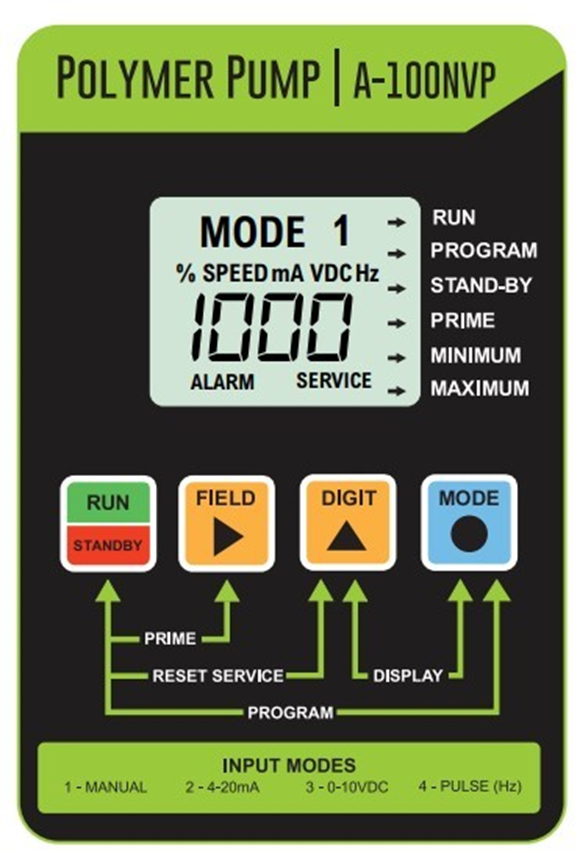
User Buttons/Keys
Run/Standby– Used to Start and Stop pump. An Arrow will appear next to “RUN” when pump is running.
Field– Used in programming mode to select digits being changed.
Digit– Used in programming mode to change digits.
Mode– Used to toggle between different operating modes.
Run/Standby and Field (together)– Primes the pumps at 100% speed for 99 seconds. An Arrow next to “PRIME” will blink when priming.
Run/Standby and Digit (together)– Resets the 500-hour timer and clears “Service” from the display.
Run/Standby and Mode (together)– Initiates programming mode. An Arrow will appear next to “PROGRAM” when in programming mode.
Field and Digit (together)– Initiates FVS programming. Set between 1-256 seconds to activate. Leave at 000 secs to de-activate.
Digit and Mode (together) – Toggles the display readout between % motor speed, and input signal value (4-20 mA, 0-10 VDC, Pulse frequency Hz)
Programming and Running the Pump
The display/touchpad allows for the programming of the following features:
- Manual Speed Setting (Mode 1)
- 4-20mA Input (Mode 2)
- 0-10 VDC Input (mode 3)
- Pulse Frequency Input (Mode 4)
- FVS (Flow Verification System)
[ NOTE: If while in the program mode, no buttons are pressed within 20 seconds, the circuitry will automatically return to the run mode, without saving changes.]
Operating Mode 1 – Manual Speed Adjust
In this mode, the pump’s motor speed is set/programmed using the front panel touch pad. The motor speed can be adjusted from 10-100%. (Note: some models have a range of 15% -100% only.)
To adjust the speed:
- Set the pump for mode 1. Press the MODE button until MODE 1 is shown on the LCD display. The %SPEED icon will light. The large 3-DIGIT LCD will indicate the currently programmed percentage of speed.
- Enter the programming mode. At the same time, press the RUN/STANDBY button and the MODE button. A blinking ARROW will point to the word PROGRAM indicating the program mode has been activated.
- Press the FIELD button to select the digit to program. The digit will blink when selected. Press the DIGIT button to change the selected digit. Repeat until all digits are programmed.
- To exit the programming mode, press the RUN/STANDBY button and the MODE button at the same time. The arrow next to the word PROGRAM will disappear.
See below video on Programming Manual Operation – Mode 1
Operating Mode 2 – 4-20 mA Input
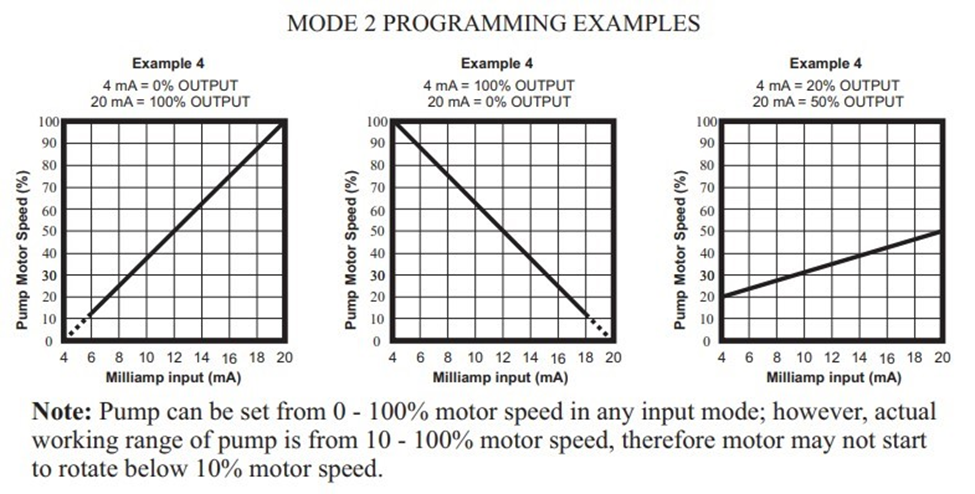
In this mode, the pump’s motor speed is adjusted automatically based on the value of the 4-20 mA input signal. Any motor speed can be assigned to either the minimum or maximum milliamp input values.
Note: The programmed minimum mA value must be less than the programmed maximum mA value. The ALARM and SERVICE icons will blink if the programming is in error.
To assign the minimum and maximum motor speed and the minimum and maximum mA input signal values:
- Set the pump for mode 2. Press the MODE button until MODE 2 is shown on the LCD display. The %SPEED or mA icon will light depending on the current display setting. The large 3-DIGIT LCD will indicate the current motor speed or the current mA input value.
- Enter the programming mode. At the same time, press the RUN/STANDBY and MODE buttons. A blinking ARROW will point to the word PROGRAM, indicating the program mode is activated.
A blinking ARROW will point to the word MINIMUM, indicating the minimum value is ready to be programmed. The % SPEED icon will blink, indicating the percentage of speed is ready to be programmed. - 进入电机速度t the minimum mA input signal value. Press the FIELD button to select the digit to program. The digit will blink when selected. Press the DIGIT button to change the selected digit. Repeat until all digits are programmed.
- Press the mode button. The % SPEED icon will stop blinking and the mA icon will blink, indicating the minimum mA value is ready to be programmed. The currently programmed minimum value is shown on the 3-DIGIT LCD.
- Enter the minimum mA input signal value. Note: this value must be less than the maximum mA input signal value. Press the FIELD button to select the digit to program. The digit will blink when selected. Press the DIGIT button to change the selected digit. Repeat until all digits are programmed.
- Repeat the process for Maximum Values.
- To exit the programming mode, press the RUN/STANDBY button and the MODE button at the same time. The PROGRAM arrow will disappear.
See below video on Programming 4-20 mA – Mode 2
Operating Mode 3 – 0-10 VDC Input
In this mode, the pump’s motor speed is adjusted automatically based on the value of the 0-10 VDC input signal. Any motor speed can be assigned to either the minimum or maximum input values.
Note: The programmed minimum 0-10 VDC value must be less than the programmed maximum VDC value. The ALARM and SERVICE icons will blink if the programming is in error.
To assign the minimum and maximum motor speed and the minimum and maximum VDC input signal values:
- Set the pump for mode 3. Press the MODE button until MODE 3 is shown on the LCD display. The %SPEED or VDC icon will light depending on the current display setting. The large 3-DIGIT LCD will indicate the current motor speed or the current VDC input value.
- Enter the programming mode. At the same time, press the RUN/STANDBY and MODE buttons. A blinking ARROW will point to the word PROGRAM, indicating the program mode is activated.
A blinking ARROW will point to the word MINIMUM, indicating the minimum value is ready to be programmed. The % SPEED icon will blink, indicating the percentage of speed is ready to be programmed. - 进入电机速度的最小直流输入团体nal value. Press the FIELD button to select the digit to program. The digit will blink when selected. Press the DIGIT button to change the selected digit. Repeat until all digits are programmed.
- Press the mode button. The % SPEED icon will stop blinking and the VDC icon will blink, indicating the minimum VDC value is ready to be programmed. The currently programmed minimum value is shown on the 3-DIGIT LCD.
- Enter the minimum VDC input signal value. Note: this value must be less than the maximum VDC input signal value. Press the FIELD button to select the digit to program. The digit will blink when selected. Press the DIGIT button to change the selected digit. Repeat until all digits are programmed.
- Repeat the process for Maximum Values.
- To exit the programming mode, press the RUN/STANDBY button and the MODE button at the same time. The PROGRAM arrow will disappear.
See below video on Programming 0-10 VDC – Mode 3
Operating Mode 4 – Frequency (Hz) Input
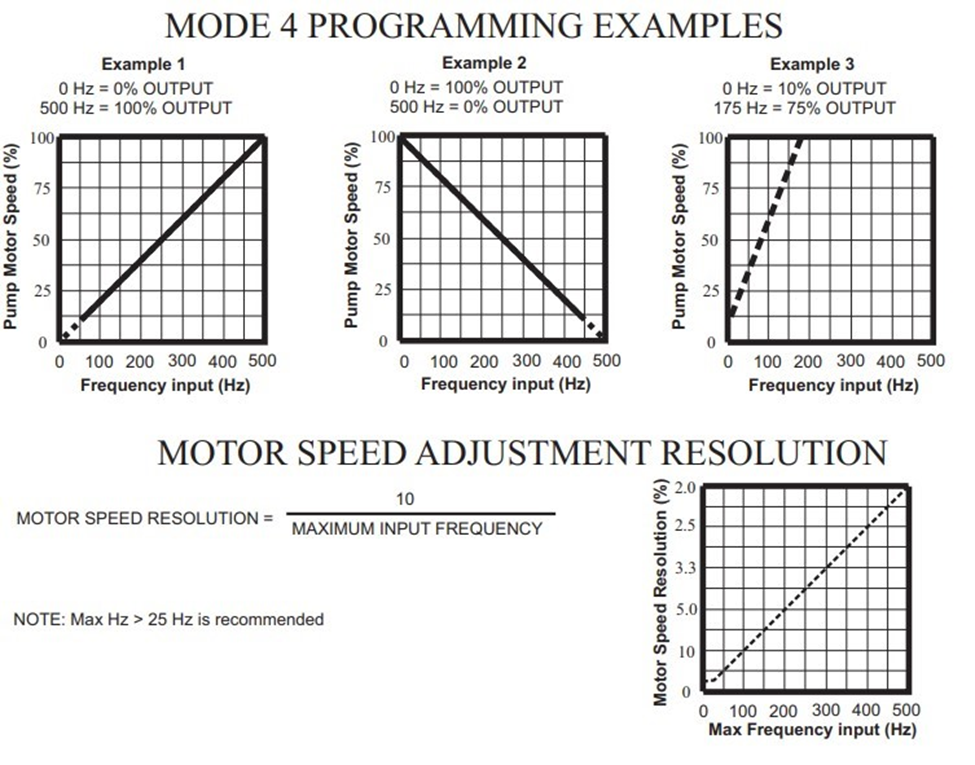
In this mode, the pump’s motor speed is adjusted automatically based on the frequency (Hz) of the input signal (500 Hz max). Any motor speed can be assigned to either the minimum or maximum input values.
Note: The programmed minimum Hz value must be less than the programmed maximum Hz value. The ALARM and SERVICE icons will blink if the programming is in error.
To assign the minimum and maximum motor speed and the minimum and maximum Hz input signal values:
- Set the pump for mode 4. Press the MODE button until MODE 4 is shown on the LCD display. The %SPEED or Hz icon will light depending on the current display setting. The large 3-DIGIT LCD will indicate the current motor speed or the current Hz input value.
- Enter the programming mode. At the same time, press the RUN/STANDBY and MODE buttons. A blinking ARROW will point to the word PROGRAM, indicating the program mode is activated.
A blinking ARROW will point to the word MINIMUM, indicating the minimum value is ready to be programmed. The % SPEED icon will blink, indicating the percentage of speed is ready to be programmed. - 进入电机速度t the minimum Hz input signal value. Press the FIELD button to select the digit to program. The digit will blink when selected. Press the DIGIT button to change the selected digit. Repeat until all digits are programmed.
- Press the mode button. The % SPEED icon will stop blinking and the Hz icon will blink, indicating the minimum Hz value is ready to be programmed. The currently programmed minimum value is shown on the 3-DIGIT LCD.
- Enter the minimum Hz input signal value. Note: this value must be less than the maximum Hz input signal value. Press the FIELD button to select the digit to program. The digit will blink when selected. Press the DIGIT button to change the selected digit. Repeat until all digits are programmed.
- Repeat the process for Maximum Values.
- To exit the programming mode, press the RUN/STANDBY button and the MODE button at the same time. The PROGRAM arrow will disappear.
See below video on Programming Frequency – Mode 4
Flow Verification System (FVS) – sensor sold separately
The A-100NVP is equipped with a Flow Verification System which is designed to stop the pump and provide a contact closure output in the event the sensor does not detect chemical during pump operation. (This could indicate a clogged injection fitting, empty chemical solution tank, worn pump tube, loose tubing connection, etc.)
To allow the pump to clear any gasses that may have accumulated during stopped operation (such as with chlorine), an alarm delay time value from 1- 256 seconds must be programmed.
Press the FIELD and DIGIT buttons at the same time to enter the delay value.
Note: an alarm delay value of 000 disables the FVS system. Any other value (001-256) activates the FVS.
The pump will stop, and the alarm mode activated, if no pulses are received by the pump and the alarm delay time period has ended.
Press the STAND-BY button twice to clear the alarm and restart the pump. The Flow Verification Sensor is sold as an optional accessory.
Ensure the flow sensor used is operated within its operating flow range. Flows that fall outside of the sensors range will create a false no-flow alarm.